Patch Panel vs Network Switch: What Does Each One Do?

When setting up a home or business network, you may come across two important pieces of equipment: a patch panel and a network switch. Although they are often installed together in a network rack, they serve completely different purposes.

Understanding the difference between a patch panel and a network switch helps you build an organized, reliable, and easy-to-maintain network.

What Is a Patch Panel?

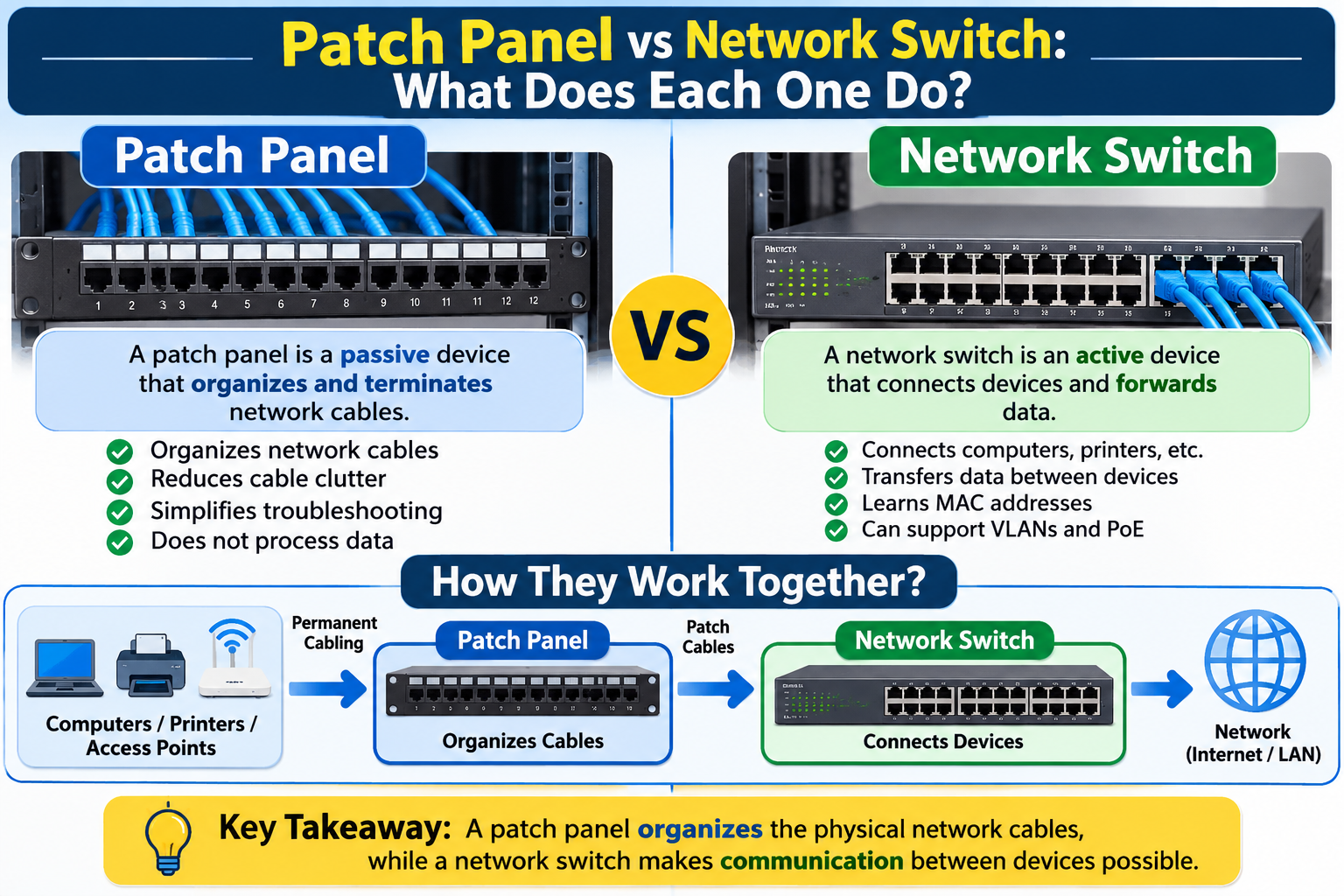
A patch panel is a passive networking component used to organize and manage Ethernet cable connections. It provides a central termination point for cables running through walls, ceilings, offices, and other areas of a building.

For example, Ethernet cables installed throughout an office can terminate at a patch panel inside a network rack. Short patch cords then connect the panel’s ports to a network switch.

Patch panels do not process network traffic or provide internet connectivity. Their main purpose is to keep permanent cabling organized and make network connections easier to manage.

Common benefits include:

  • Organized Ethernet cable management
  • Easier troubleshooting and maintenance
  • Convenient cable changes and upgrades
  • Reduced wear on permanent cable runs

Patch panels are commonly available in 12-port, 24-port, and 48-port configurations.

What Is a Network Switch?

A network switch is an active networking device that connects computers, printers, access points, servers, and other Ethernet-enabled equipment.

Unlike a patch panel, a network switch actively forwards data between connected devices. It uses MAC addresses to send Ethernet frames toward their intended destinations.

For example, when a computer sends data to a network printer, the switch helps deliver that traffic through the appropriate network connection.

Some switches also support Power over Ethernet (PoE), allowing them to supply electrical power to compatible devices such as IP cameras, VoIP phones, and wireless access points.

Common benefits include:

  • Connecting multiple network devices
  • Forwarding data between devices
  • Supporting faster network connections
  • Providing PoE on compatible models
  • Enabling VLANs and network management on supported switches

Patch Panel vs Network Switch: Key Differences

FeaturePatch PanelNetwork Switch
Main purposeOrganizes cable connectionsConnects network devices
OperationPassiveActive
Handles data trafficNoYes
Requires powerNoYes
PoE supportNoAvailable on compatible models
Typical locationNetwork rackNetwork rack or cabinet

Do You Need Both?

For most structured office networks, using both is a practical approach.

Permanent Ethernet cables from different rooms connect to the patch panel. Short patch cords then connect the patch panel ports to the network switch. The switch provides network connectivity to the connected devices.

This setup keeps permanent cabling organized while allowing administrators to change network connections without disturbing the installed cables.

Small home networks may work perfectly well with a switch alone, especially when only a few devices need wired connections.

Final Verdict

A patch panel and a network switch are not interchangeable. A patch panel organizes and terminates Ethernet cabling, while a network switch connects devices and forwards network traffic.

For professional installations, using both creates a cleaner and more manageable network infrastructure. Choosing the right setup depends on the number of connections, building layout, and future networking requirements.

Leave a Reply

Your email address will not be published. Required fields are marked *


Related Projects