
-40%
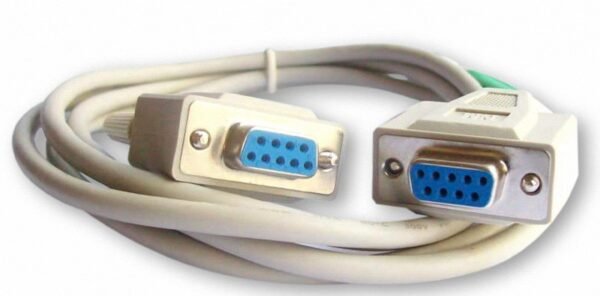
9 Pin Serial Port Cable Female
0 out of 5
$25.00 Original price was: $25.00.$15.00Current price is: $15.00.
9 Pin Serial Port Cable Female
$25.00 Original price was: $25.00.$15.00Current price is: $15.00.
In stock
SKU: SMSITTRAY-1
Categories: Network Hardware, Accessories
- Description
- Reviews (0)
Description
9 Pin Serial Port Cable Female – DB9 Serial Connectivity
The 9 Pin Serial Port Cable Female from 52Networks is designed for compatible devices that use a 9-pin DB9 serial interface. Serial cables remain useful in many computer, industrial, networking, and equipment maintenance applications where reliable communication between compatible devices is required.
Whether you are connecting legacy computer equipment, configuring compatible hardware, or maintaining a serial communication system, selecting the correct cable is essential. Before purchasing, check the connector gender, wiring configuration, cable length, and communication requirements of your equipment.
Key Features of the 9 Pin Serial Port Cable Female
- 9-pin DB9 interface: Designed for compatible equipment with a matching 9-pin serial connector.
- Serial connectivity: Suitable for supported serial communication applications when the cable wiring matches the connected devices.
- Versatile applications: Useful for compatible computer equipment, industrial hardware, and technical systems.
- Equipment configuration: Can be used with supported devices that provide a serial configuration or management interface.
- Compatibility-focused design: Helps connect equipment that requires the appropriate DB9 cable configuration.
Verify the actual connector arrangement and product specifications before ordering.
Applications of a DB9 Serial Cable
Computer and Legacy Equipment
Some computers and older hardware use serial interfaces to communicate with external devices. A compatible 9-pin serial cable can connect supported equipment for data communication, configuration, or maintenance.
Networking Equipment Configuration
Certain networking devices provide serial console ports for configuration and troubleshooting. However, not every console port uses a standard DB9 RS-232 interface. Check your equipment documentation and determine whether a straight-through cable, null modem cable, or console-specific cable is required.
Explore our networking and connectivity products for additional equipment used in network installations.
Industrial and Technical Applications
Serial communication is used in various technical environments, including compatible control systems, measurement equipment, and industrial devices. The correct cable depends on the interface, electrical specifications, and wiring requirements of the connected equipment.
Equipment Maintenance and Troubleshooting
Technicians may use compatible serial cables to configure supported devices, inspect system settings, and troubleshoot communication problems. Confirm the connector type and pinout before connecting the cable to avoid compatibility issues.
Understanding DB9 and RS-232 Compatibility
DB9 describes a connector commonly used for 9-pin serial interfaces, while RS-232 refers to an electrical serial communication standard. These terms are related but are not interchangeable.
A cable with a DB9 connector is not automatically compatible with every serial device. Some devices require specific pin assignments, while others use different communication interfaces or cable wiring.
For additional technical information, review the official Texas Instruments RS-232 interface resources and Digi technical resources.
Product Specifications
- Product Name: 9 Pin Serial Port Cable Female
- Connector Type: DB9, subject to product verification
- Connector Gender: Female as indicated in the product name; confirm both ends
- Communication Interface: RS-232 where supported by the actual cable and connected devices
- Cable Length: Refer to the product listing
- Wiring Configuration: Verify whether straight-through or null modem
- Primary Use: Compatible serial data connections
Confirm the exact product specifications on the product listing before placing an order.
How to Choose the Right 9 Pin Serial Cable
Before buying a 9 Pin Serial Port Cable Female, check the connector on each device. Determine whether the cable needs female-to-male, female-to-female, or another connector arrangement.
Next, check the pinout and wiring requirements. A straight-through cable connects corresponding pins according to its wiring design, whereas a null modem cable uses a different arrangement intended for certain device-to-device connections.
You should also consider the required cable length, the communication standard, and whether your equipment requires a USB-to-serial adapter instead of a direct serial cable.
If you are building a wider network installation, you can also explore our Cat6 network patch panel for structured Ethernet cabling applications.
Frequently Asked Questions
What is a 9-pin serial port cable used for?
It connects compatible devices that communicate through a 9-pin serial interface. Applications may include supported computer hardware, equipment configuration, and technical systems.
Is a DB9 cable always compatible with RS-232?
No. Connector shape alone does not establish electrical compatibility. Verify the interface standard and pinout required by both devices.
What is the difference between a straight-through cable and a null modem cable?
They use different wiring configurations. The correct choice depends on how the two devices communicate and which pins their documentation specifies.
Can this cable connect to modern computers?
Modern computers may not include a native serial port. Depending on the device and application, a compatible USB-to-serial adapter may be necessary.
How can I confirm compatibility before ordering?
Check the device manuals for connector gender, pin assignments, communication standard, and cable type. Match these requirements to the exact product specifications.
Order Your 9 Pin Serial Port Cable from 52Networks
Choose the appropriate serial cable for your equipment and connectivity requirements. By confirming connector type, wiring configuration, and supported communication standards before ordering, you can reduce compatibility issues and select a suitable cable for your application.
Browse the 52Networks product range for additional networking and connectivity solutions.


Reviews
There are no reviews yet.